
Download TTSVox – Free Text‑to‑Speech Converter, High‑Quality Voiceovers
Overview
TTSVox is a free, web‑based text‑to‑speech (TTS) solution that turns written content into clear, natural‑sounding voiceovers in just a few clicks. Built on advanced speech synthesis algorithms, the platform delivers high‑quality audio that feels conversational rather than robotic. This makes TTSVox an ideal tool for people with visual impairments, reading difficulties, or anyone who needs to listen to text instead of reading it.
The service supports a growing roster of languages, each with multiple voice options that differ in gender, accent, and tone. Whether you’re an educator creating narrated lessons, a content creator adding audio to blog posts, or a business building interactive voice response (IVR) scripts, TTSVox offers a flexible, cost‑free alternative to pricey desktop software.
One of the most compelling aspects of TTSVox is its accessibility‑first design.
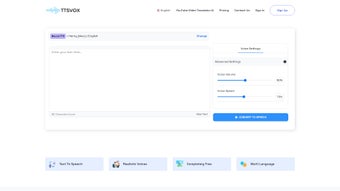
The user interface is intentionally minimal: a large text box, a language selector, voice‑customization sliders, and a single “Convert” button. No downloads, no installations, and no hidden fees are required. All processing happens in the cloud, meaning you can access the tool from any device with an internet connection—be it a Windows laptop, a macOS desktop, an Android tablet, or an iPhone.
Because the service runs entirely in the browser, updates are applied automatically, guaranteeing that you always benefit from the latest speech‑engine improvements without manual intervention.
Beyond accessibility, TTSVox is built for productivity. The generated audio files can be downloaded instantly in MP3 format, ready for embedding in presentations, uploading to learning management systems, or sharing on social media.
Users can also adjust the speaking rate, pitch, and volume to match the tone of their project, ensuring that the final output aligns with brand guidelines or pedagogical goals. In short, TTSVox bridges the gap between written and spoken content, empowering a diverse audience to consume information in the way that best suits them.
Key Features and Benefits
- Multi‑Language Support: Over 30 languages, each with regional accents (e.g., US English, British English, Australian English, Spanish (Spain), Spanish (Latin America), Mandarin, Hindi, etc.).
- Voice Customization: Choose gender (male/female), adjust tone, pitch, and speed with intuitive sliders.
- Instant MP3 Download: Generate high‑quality audio and download it with a single click, no watermark or limit on file size.
- Browser‑Based Operation: No software installation required; works on any modern browser (Chrome, Firefox, Safari, Edge).
- Accessibility‑Focused UI: Large text area, clear labels, keyboard‑friendly navigation, and screen‑reader compatibility.
- Secure Cloud Processing: All text is encrypted during transmission, and no personal data is stored after conversion.
- Free Forever Model: No hidden subscription fees, premium plans are optional for bulk API access only.
- API Ready (Future Roadmap): Planned RESTful API for developers who need automated TTS integration.
The benefits of these features extend far beyond simple convenience. For educators, the ability to generate multi‑language audio on the fly supports inclusive classrooms where English‑language learners can follow lessons in their native tongue. Content marketers can produce quick voiceovers for video scripts, podcasts, or social media teasers without hiring voice talent, cutting production costs dramatically.
In the corporate sector, TTSVox can be used to create consistent IVR prompts, internal training modules, and accessibility statements that meet legal compliance standards such as the Americans with Disabilities Act (ADA).
Because TTSVox runs entirely in the cloud, performance scales automatically: large blocks of text are processed in seconds, and the service can handle multiple concurrent users without degradation. The platform’s commitment to security means that confidential documents—like legal briefs or internal memos—remain private; once a conversion is complete, the server purges the text automatically, adhering to a strict no‑log policy.
In summary, TTSVox offers a rare combination of breadth (languages and voices), depth (customization options), and simplicity (no download, no cost). This makes it a compelling choice for anyone looking to transform static text into engaging, audible content.
Installation, Usage, and Compatibility
Getting Started – No Installation Required
Since TTSVox is a web‑based tool, the first step is simply to navigate to the official website using any modern browser. There is no need to download installers, manage licenses, or configure system settings. The landing page presents a clean workspace: a large editable text box, a language drop‑down, voice selection radio buttons, and a “Convert to Speech” button. Users can copy‑paste text directly, type manually, or even upload a plain‑text file (supported formats: .txt, .md). Once the text is in place, selecting the desired language and voice is a matter of a few clicks.
Step‑by‑Step Conversion Process
- Enter or upload your text. The maximum character limit per conversion is 10,000 characters, which is sufficient for most articles, emails, or lecture notes.
- Select language and voice. Use the drop‑down to pick a language, then choose a specific voice profile (e.g., “English – Female – US”).
- Adjust speech parameters. Slide the “Speed,” “Pitch,” and “Volume” controls to match the desired tone.
- Click “Convert”. The platform sends the text to the cloud‑based synthesis engine, which returns an MP3 file within seconds.
- Download or preview. A preview player appears, allowing you to listen before saving. Click “Download MP3” to store the file locally.
Operating System Compatibility
Because everything runs in the browser, TTSVox is compatible with all major operating systems:
- Windows 10/11: Chrome, Edge, Firefox, and Safari (via Apple’s web‑kit).
- macOS (Catalina and later): Safari, Chrome, Firefox.
- Linux distributions: Chrome, Firefox (any modern desktop environment).
- Mobile platforms: Android (Chrome, Firefox) and iOS (Safari, Chrome). The responsive UI adapts to smaller screens, maintaining full functionality on smartphones and tablets.
Tips for Optimal Results
• Break large documents into sections. If you exceed the 10,000‑character limit, split the text into logical parts (chapters, paragraphs) and convert them individually.
• Use plain language. Complex jargon or highly technical terms may be mispronounced; adding phonetic hints in brackets can improve accuracy.
• Test different voices. Some accents handle certain phonemes better; experiment to find the most natural‑sounding option for your audience.
• Leverage the preview. Listening before download helps catch any mispronunciations or pacing issues early, saving time on post‑production editing.
Pros, Cons, and Frequently Asked Questions
Pros & Cons
- Pros:
- Completely free with no hidden fees.
- No installation – works directly in the browser.
- Supports over 30 languages and multiple voice styles.
- High‑quality MP3 output ready for immediate use.
- Secure, encrypted transmission and automatic data deletion.
- Responsive design works on desktop, tablet, and mobile.
- Cons:
- Requires an internet connection; offline use is not available.
- Character limit per conversion (10,000 characters) may require splitting large documents.
- Advanced batch processing or API access is only available in a future premium tier.
FAQ – Answers to Common Queries
Is TTSVox really free, or are there hidden charges?
TTSVox is completely free for all core features, including unlimited conversions within the 10,000‑character limit per file. There are no subscription fees, ads, or hidden costs. A premium API service is planned for developers who need bulk processing, but the standard web tool remains free forever.
Can I use TTSVox on a mobile device?
Yes. The platform is fully responsive and works on Android and iOS browsers such as Chrome, Safari, and Firefox. All functionality—including voice selection, customization sliders, and MP3 download—is available on smartphones and tablets.
What file formats does TTSVox support for download?
Converted audio is provided as an MP3 file, which is universally compatible with most media players, video editors, and learning‑management systems.
Is my text stored on TTSVox servers after conversion?
No. TTSVox follows a strict no‑log policy. Once the audio file is generated and delivered, the original text is automatically purged from the server within minutes, ensuring privacy and security.
How do I improve pronunciation for uncommon words or names?
You can add phonetic hints using brackets or standard IPA notation directly in the text. For example, writing “Google [ˈɡuːɡəl]” helps the engine pronounce the brand name correctly.
Conclusion & Call to Action
TTSVox stands out as a reliable, cost‑free text‑to‑speech solution that blends high‑quality voice synthesis with an ultra‑simple web interface. Its multi‑language support, customizable voice parameters, and instant MP3 downloads make it a versatile tool for educators, content creators, businesses, and individuals seeking accessible audio content. While it does rely on an internet connection and imposes a modest per‑file character limit, these trade‑offs are outweighed by the convenience of a zero‑install, zero‑fee platform that respects user privacy.
If you need to transform written material into engaging narration—whether for e‑learning modules, podcast intros, or accessibility compliance—TTSVox is ready to deliver. Visit the official website, paste your text, select your preferred voice, and click “Convert.” In seconds you’ll have a polished audio file ready for download and distribution.
Start using TTSVox today and experience the power of free, high‑quality text‑to‑speech conversion.



.png)



